A proposed enhancement to Kobo EReaders to support book tracking generic book tracking is better than one-off implementations
This describes a potential Kobo integration that is generic with respect to book logging services; the burden of integration and support is on the book logging service, not Rakuten.
Service description and Kobo UI
The general design is that the Kobo device itself pushes some Kobo book state to a properly configured receiver when the Kobo syncs.
The set-up on the device would look something like:
- A text entry field for a site that can handle the POST.
- An on/off button for that site (so the end-user can disable it without deleting it).
- An authentication token text entry field for that site.
- Exclude books unread in the past [1,2,3,4,5,6,7,8] weeks from the update.
- A button to add another site to which to push data.
Examples of the UI on the Kobo device are shown in Figure 1 and Figure 2.
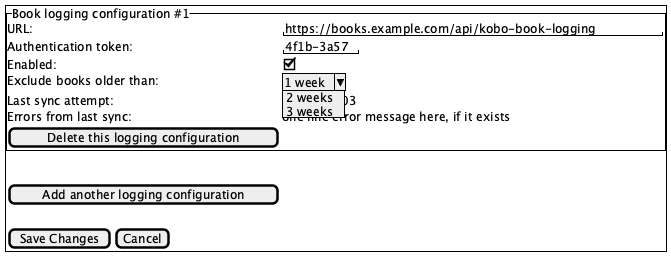
Figure 1: An example UI for the configuration on the Kobo device; it is up to the receiver to inform the user of the correct values and otherwise provide instructions for configuration and expectations
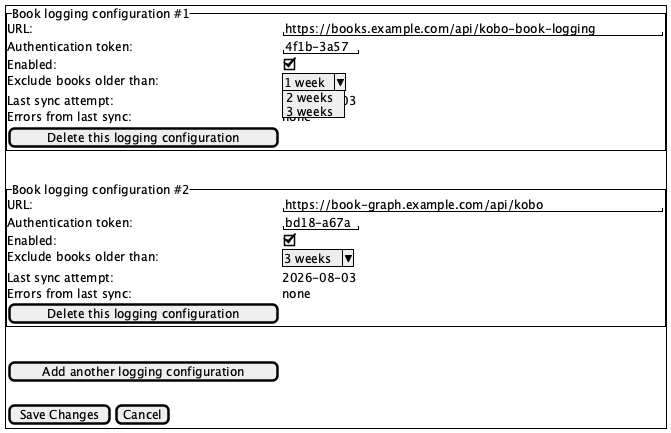
Figure 2: An example of UI showing two configurations
The Kobo device would issue an https POST to the
site(s) configured and deliver one body that contains all of the
information it can send. This may be formatted as JSON, CBOR, Protobuf, or
whatever Rakuten implements. Examples of JSON bodies and OpenAPI
specifications are below.
This would allow any book reading app (Goodreads, StoryGraph, Bookly,
Fable, Bookbeee, etc.) to implement an endpoint for their Kobo users.
Their uses will need to configure it. The endpoint will accept the data
and do what they want with it. This is a
POST-only, outbound-only activity from the device that
doesn't involve the Kobo servers at all. In fact, the device can ignore
status codes from the receiving server entirely, if it wants
(alternatively, it could return a short error code that would be displayed
by the Kobo device; this is shown in the wire-frame diagrams).
This will send side-loaded (Dropbox/GDrive) book data, although the data for those books may be incomplete, and the receiver will have to decide what to do with that information.
NB: I don't know what data the Kobo device has that might be useful to the book tracking service. I may have over-estimated what the Kobo device can send, or left out useful information I didn't know the Kobo device had.
In summary:
- the data comes directly from the Kobo Ereader device and it sent to the receiving service
- the receiving service is responsible for accepting the data sent from the Kobo Ereader device
- the receiving service is responsible for documenting the configuration for their end users
- Rakuten is responsible for publishing the specification for each version so those implementing a receiving service can continue to accept data from Kobo Ereader devices.
Example JSON body
An example POST'd JSON body might be:
{
  "header": {
    "deviceId": "asdfsadf",
    "apiVersion": "1.0.0"
  },
  "books": [
    {
      "title": "asdfasdf",
      "author": "Asdf Gfasdgf",
      "isbn": "123sdf-sadf234-sadf-234",
      "publication": {
        "publisher": "asdfsadf",
        "date": "1976-07-04",
        "fileFormat": "PDF",
        "coverArt": "base-64-encoded-png-or-jpg==",
        "numPages": 123
      },
      "reading": {
        "pagesLastRead": 4,
        "dateLastRead": "2026-03-04"
      }
    }
  ]
}
Example OpenAPI specification
An OpenAPI specification for a server that wants to receive the data (and for the device sending the data) might look like:
openapi: 3.0.3
info:
  title: Kobo POST body
  version: 1.0.0
  description: >-
    The OpenAPI spec for receiving this version of a POST
    request
  license:
    name: MIT
    url: https://opensource.org/licenses/MIT
servers:
  - url: https://www.example.com/api
security:
  - bearerAuth: []

paths:
  /kobo-reading-data:
    post:
      summary: Accept Kobo reading data
      operationId: acceptKoboReadingData
      requestBody:
        description: >-
          The endpoint that accepts requests from the Kobo
          device configured to send data
        content:
          application/json:
            schema:
              type: object
              properties:
                header:
                  $ref: "#/components/schemas/header"
                books:
                  $ref: "#/components/schemas/books"
      responses:
        "200":
          description: Reading data accepted
        "404":
          description: Not found
        "429":
          description: Too many requests
        "400":
          description: Bad request
components:
  securitySchemes:
    bearerAuth:
      type: http
      scheme: bearer
      bearerFormat: JWT
  schemas:
    header:
      type: object
      required:
        - version
      properties:
        version:
          type: string
          example: "1.0.0"
        deviceId:
          type: string
          example: "4b2e45a9-36c0-4dcb-b484-9d251ff6abc6"
    publish:
      type: object
      properties:
        publisher:
          type: string
          example: "Simon and Schuster"
          description: The name of the publisher
        date:
          type: string
          example: "1976-07-04"
          description: The publication date in YYYY-MM-DD format
        fileFormat:
          type: string
          enum:
            - EPUB
            - EPUB3
            - KEPUB
            - PDF
            - MOBI
            - TXT
            - HTML
            - RTF
            - CBZ
            - CBR
            - UNKNOWN
          description: >-
            The format of the document on the Kobo, falling back to
            `UNKNOWN` if the format is not one of the others. This can be
            updated, but will also cause a version bump in the API version in
            the POST, so you can either deal with this as an enum of known
            values, or reject updates from later API versions until you are able
            to update the receiver to handle the new types
        numPages:
          type: integer
          example: 426
          description: The number of pages in the book
        coverArt:
          type: string
          description: a base64-encoded JPEG or PNG file
    reading:
      type: object
      properties:
        pagesLastRead:
          type: integer
          example: 4
          description: >-
            The number of pages read in the last "session" or since
            the last update or whatever the Kobo device wants to put here
        lastReadDate:
          type: string
          example: "2026-03-04"
          description: The date this book was last read in YYYY-MM-DD format
    book:
      type: object
      properties:
        title:
          type: string
          example: Meditations
        author:
          type: string
          example: Marcus Aurelius
        isbn:
          type: string
          example: "9780812968255"
        publication:
          $ref: "#/components/schemas/publish"
        reading:
          $ref: "#/components/schemas/reading"
    books:
      type: array
      items:
        $ref: "#/components/schemas/book"